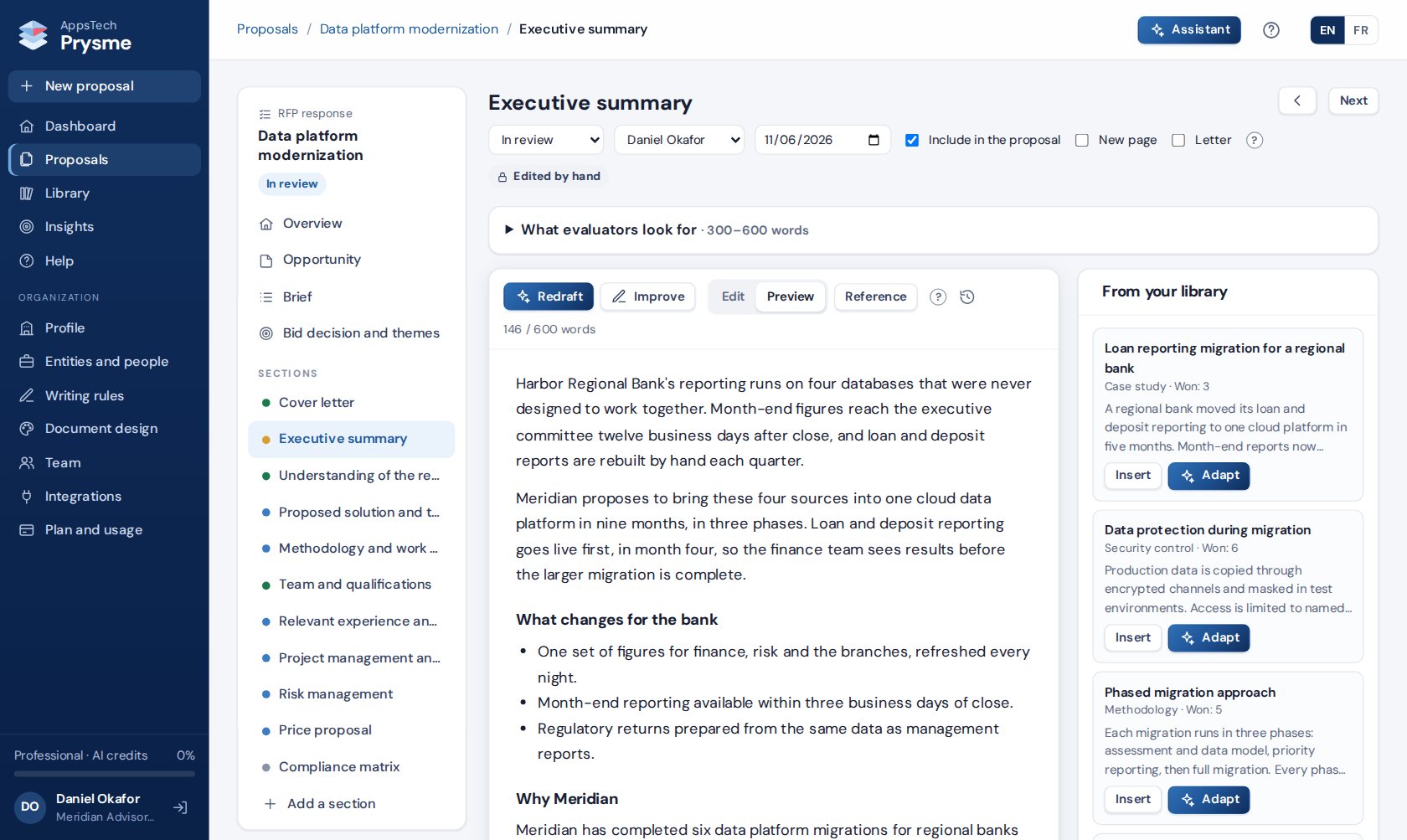
Prysme is proposal software for companies answering RFPs and organizations applying for grants. It drafts from your approved content, tracks every requirement, and produces the finished document in your format, in English or French.
The free trial lasts 14 days, with no credit card required.
Prysme is designed and built by AppsTech Labs.
Prysme works on its own, in a browser, with every feature included. Teams that already use Salesforce or Google Drive can connect them, so that opportunities and documents come into Prysme without retyping.
 Salesforce
 Google Drive
Your team reviews each section. Before the proposal goes out, a panel of AI evaluators reads the whole draft the way the buyer or funder will. Each one scores it against the call's own evaluation criteria and weights, as Prysme read them from the call, and against the criteria of their profile.
The profiles include a buyer's IT director, a buyer's CFO, an information security assessor, a public procurement evaluator, an EU grant evaluator and a community foundation program officer. A reviewer can also be built from the call in one click: the call's scoring grid and its weights become the reviewer's criteria.
Each reviewer scores every criterion, gives a verdict, lists strengths and weaknesses, ranks the fixes by priority and asks the questions you are likely to face. Each fix quotes the passage concerned and names its section. Every reviewer also runs four checks: figures with no visible source, win themes not tied to a scoring criterion, results that restate the activities, and a budget narrative that differs from the budget table or the work plan.
Your team ticks the fixes it accepts, and Prysme redrafts the sections concerned from your own sources. When a fix needs a figure your sources do not contain, Prysme asks you for it. A section edited by hand is redrafted with your agreement. A second run of the panel shows the new scores.
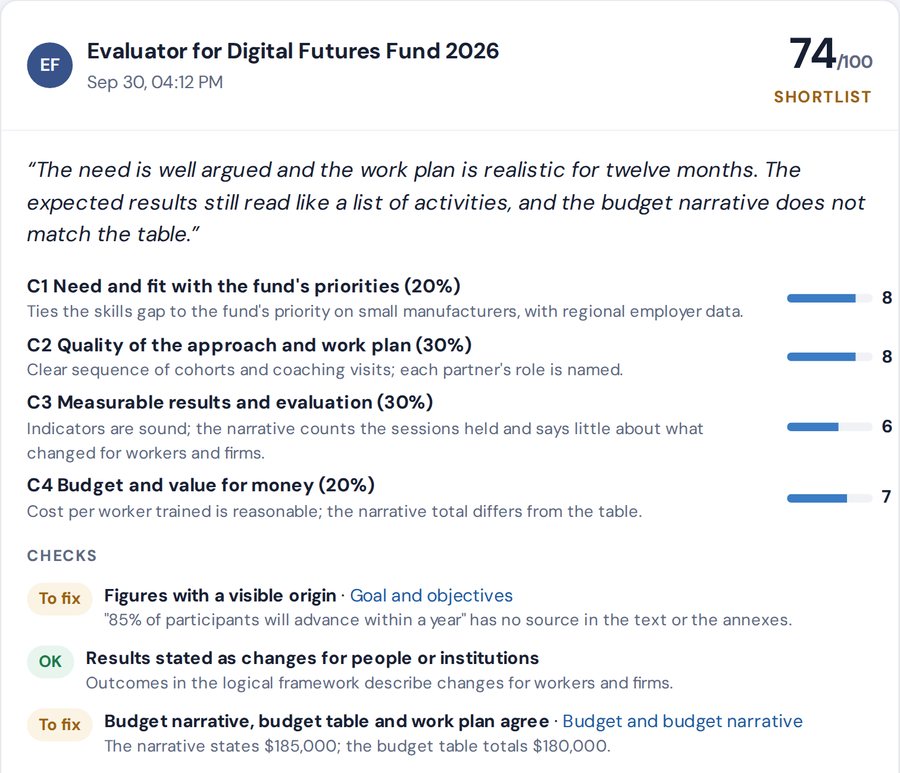
Prysme reads the scoring grid in the call, builds a reviewer from it and scores the draft against each criterion. The recording has no sound and carries captions.
The organizations, calls and figures in these samples are fictional.
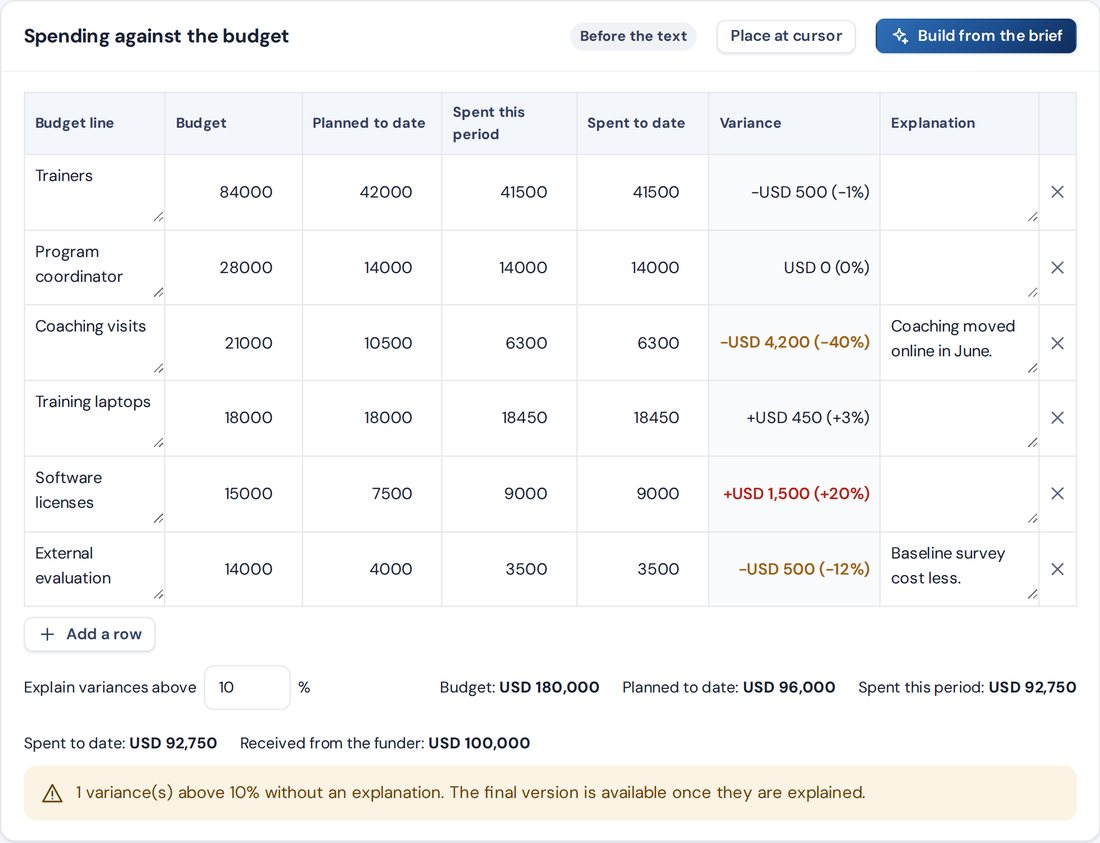
Prysme prepares interim, annual and final reports on the grants you win. The funder, the project, the indicators with their targets and the budget lines come across from the grant proposal. Your team enters what was achieved and what was spent. Prysme then drafts the narrative from those figures and from the grant, and checks the report before it goes out.
Each plan has one price for the whole team, with no fee per proposal.
AI credits measure AI work. As a guide, a full section draft uses about 6 credits, a reviewer about 10, and reading an average opportunity document about 12. The monthly allowance renews each month.
Extra AI credits: 1,000 credits for $69 on any paid plan, kept until used.
Extra team members: packs of 5 at $159 a month on the Professional plan. Each pack adds 10 active proposals and reports and 2,000 AI credits a month.
Payment by card through Stripe's secure checkout, or by invoice on request. Applicable taxes are calculated at checkout.
Nonprofits tick "We are a nonprofit organization" when they sign up and add their registration document. AppsTech Labs reviews it, usually within 2 business days, and the trial continues during the review. Once the status is confirmed, the 30% applies from the first payment.
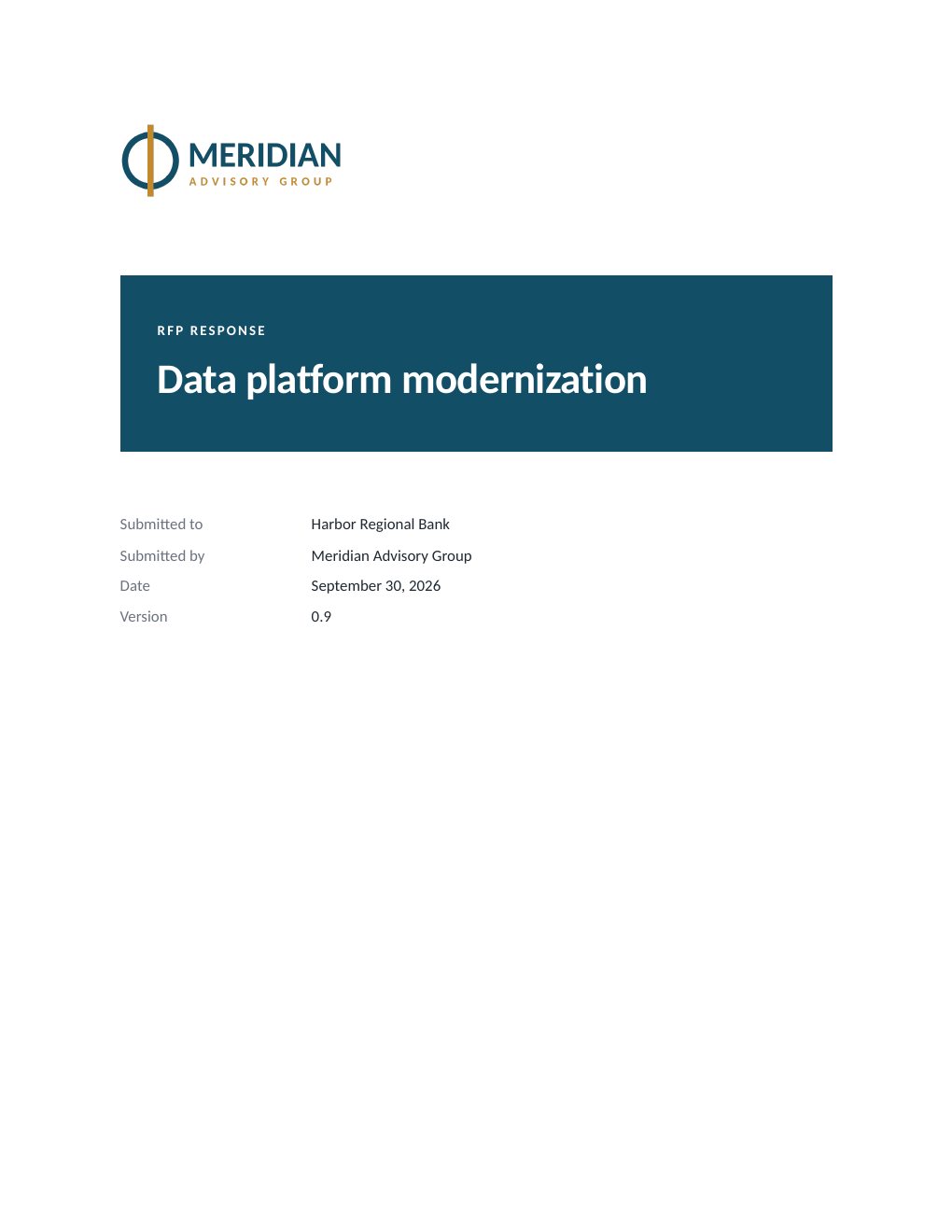
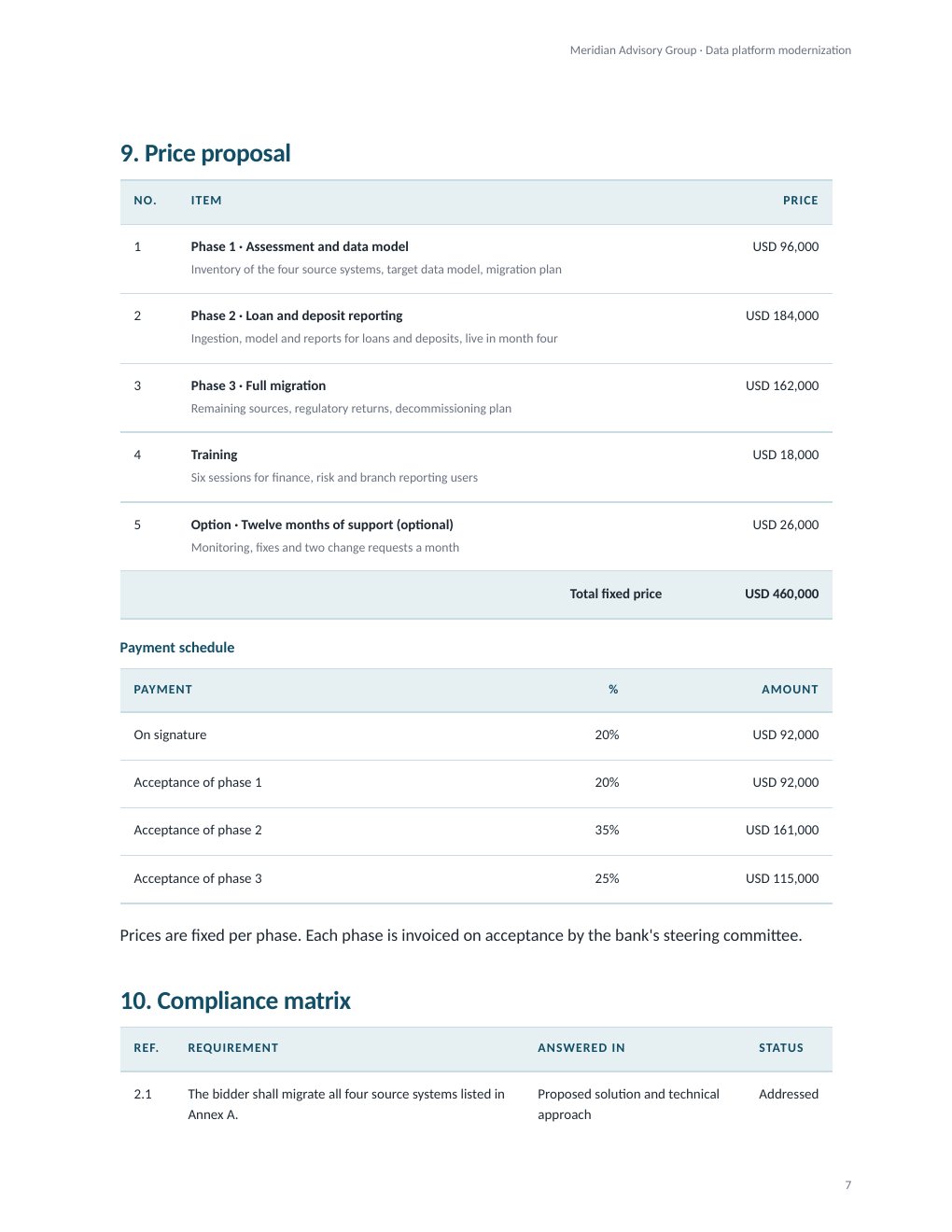
Prysme produces the document you submit, in Word or PDF. Price each item at a fixed fee or by quantity and unit price, with your company's tax rate and a payment schedule. Legal terms pull from your company's registration details, governing law and authorized signer. Your fonts, colors, logo and cover page apply to every export, and diagrams are drawn in the same colors.
The RFP, terms of reference or call for proposals is uploaded as a PDF, Word or Excel file. Prysme lists every requirement and scoring criterion, proposes entries for the brief, and highlights potential red flags. Your team plans the response from that list, with less rereading and fewer missed requirements.
Each proposal has its own language, separate from the language of the screens. To answer in both, Prysme creates a second edition from the same brief, facts and tables and drafts it directly in the other language. French text is checked for common anglicisms.
Yes. Each section is drafted from your company profile, your library, the RFP or call for proposals, and the facts you confirm. When a figure or a detail is missing, Prysme asks you for it, and your answer goes into the next draft.
Yes. Each proposal exports as a Word (.docx) file for final formatting and as a PDF for submission. Your fonts, colors, logo and cover page apply to both, and the compliance matrix can be added as an annex.
There are two kinds of review. Your team reviews each section: it has an owner and a due date, comments stay attached to it, and it moves from draft through review to approval. The reviewer panel then reads the whole proposal the way the buyer or funder will, and gives each reviewer's score, verdict and priority fixes.
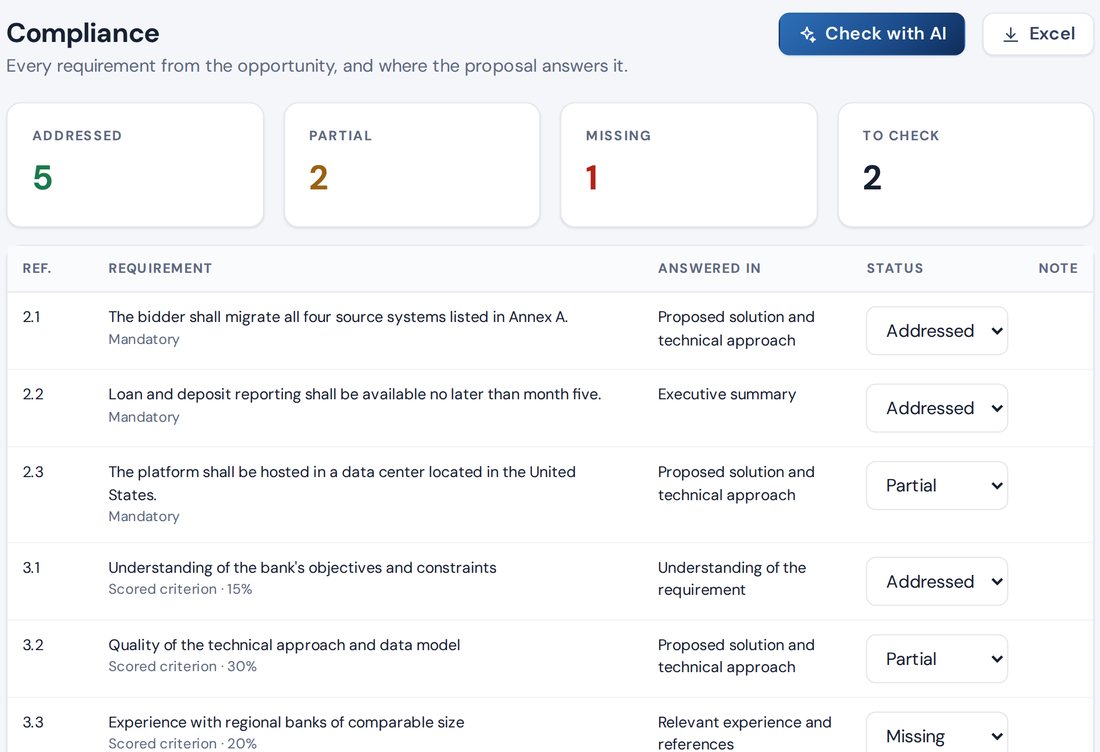
Prysme lists every requirement and scoring criterion in the RFP or call for proposals. The compliance matrix shows the section that answers each one and its status: addressed, partly addressed, missing or to check.
No. Prysme works on its own, in a browser, with every feature included. Salesforce and Google Drive are optional connections for teams that already use them.
Yes, as an option on every plan. You can start a proposal from a Salesforce Opportunity. When the proposal's status changes, Prysme updates the stage of the Salesforce Opportunity, and the amount, close date and win or loss reason when your administrator has chosen those fields. It attaches the Word file when the proposal is marked submitted.
Yes, as an option on every plan. You can open an RFP, a call for proposals or a questionnaire from Google Drive, and save the Word file of a proposal to a Drive folder. Each user signs in with their own Google account, and access covers the files you choose and the files Prysme saves.
Registered nonprofits pay 30% less on every plan. At sign-up, the organization ticks "We are a nonprofit organization" and adds its registration document, as a PDF, JPG or PNG file. AppsTech Labs reviews it, usually within 2 business days, and your trial continues during the review. Once your status is confirmed, the 30% applies from your first payment.
Plans are billed monthly or yearly, by card through Stripe's secure checkout. Organizations that need to pay by invoice can ask us, and invoices are payable within 30 days. Applicable taxes are calculated at checkout. A cancellation takes effect at the end of the period already paid. The first payment of a plan, monthly or yearly, is refunded in full on request within 14 days. The terms of service give the details.
Your content is stored on a private server administered by AppsTech Labs, and each organization's data is kept separate from that of other customers. Prysme drafts and reviews with Anthropic's Claude models. Under Anthropic's terms for commercial products, the content sent to the models is excluded from model training by default and deleted within 30 days. Card payments are processed by Stripe, which holds the card details. After a cancellation, the data remains available for export for 90 days and may then be deleted; on a written request, it is deleted sooner, within 30 days. A data processing agreement is available on request. The security and data note (PDF) gives the details.
Yes. The free trial lasts 14 days, with three team members, ten active proposals and 1,000 AI credits. No credit card is required.
The trial includes three team members, ten active proposals and 1,000 AI credits, with no credit card required. The first sections can be drafted from an RFP you are working on now, once it is uploaded and your company profile is filled in.
Start a free trial