AppsTech Prysme

Full features and specifications.
Every feature, in every plan.

Prysme reads the RFP or call for proposals and drafts each section from your own content. It assembles the document in your layout. Before you submit, a panel of AI evaluators scores the finished draft. This page lists every feature and the specifications behind them.

The free trial lasts 14 days, with no credit card required.

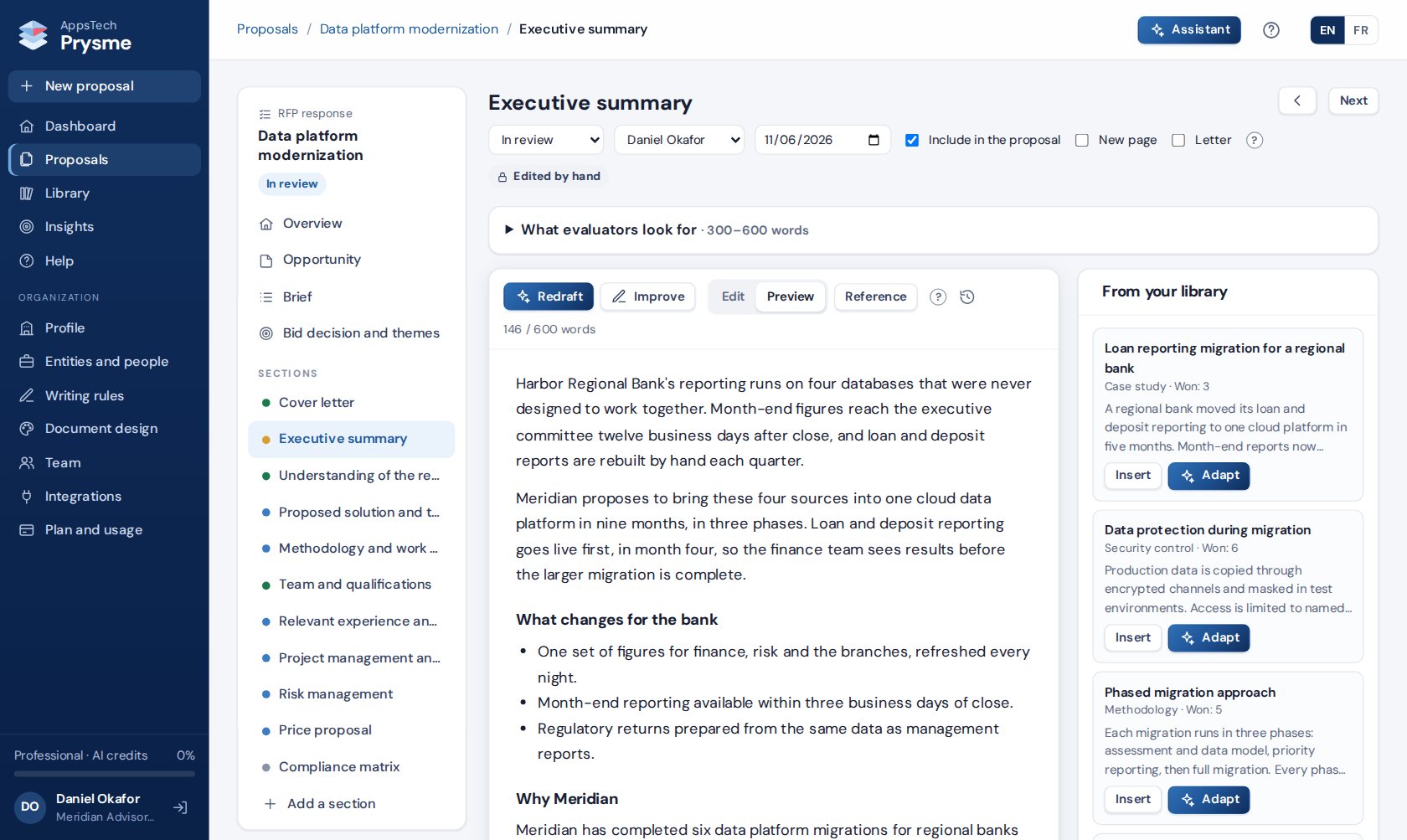
A proposal section in Prysme, with suggestions from the library
Actual application screen · Demo data
92features, all included in every plan
22reviewer profiles for the AI evaluation panel
7kinds of document, from RFP responses to reports to funders
2languages, each edition drafted as an original
The difference

A panel of AI evaluators reads the draft before the buyer or funder does.

Your team reviews each section. Then the reviewer panel reads the whole proposal the way the evaluators will, and scores it against the call's own criteria while there is still time to fix it.

  • 22 reviewer profiles. The profiles suited to the type of proposal are offered first, and the others are one click away.
  • A reviewer built from the call in one click. The call's scoring grid and its weights become the reviewer's criteria.
  • Your own reviewer. Your team describes a reviewer by name, role and reading habits, with up to 15 criteria.
  • The document as it will be exported. Reviewers read the cover letter with its signature block, the tables with their totals and the compliance matrix.
  • Scores and a verdict. Each reviewer scores every criterion and gives a verdict, such as fund, shortlist or decline, with strengths and weaknesses.
  • Fixes ranked by priority. Each fix quotes the passage concerned and names its section.
  • Likely questions. Each review ends with the questions the evaluator is likely to ask.
  • Four checks on every draft. Every reviewer looks for figures with no visible source, win themes not tied to a scoring criterion, results that restate the activities, and a budget narrative that differs from the budget table or the work plan.
  • You choose the fixes. Prysme redrafts the sections concerned from your own sources. A second run shows the new scores.
  • Reviews in your language. Reviewers write in the language of your screens. Quotes from a proposal in the other language keep the original wording, followed by a translation.

The 22 reviewer profiles

Your team can add a reviewer it describes, or one built from the call.

Public procurement evaluatorRFP technical evaluatorBuyer’s CFO and price reviewerBuyer’s IT director (CIO)Buyer’s head of operationsLegal and contracts reviewerInformation security assessorSkeptical executive decision makerEU grant evaluatorBilateral donor program officerDevelopment bank task team leaderFamily foundation trusteeCommunity foundation program officerSilicon Valley philanthropistCorporate ESG and CSR managerPartnership and localization reviewerTechnical expert reviewerFinance and budget reviewerMonitoring and evaluation specialistProgram officer reviewing a reportGrant accountantFirst-time readerBuilt from the call's scoring grid

See how Prysme compares with Responsive, Loopio and AutogenAI →

The catalog

Features in every plan.

Every plan includes every feature below. Plans differ only in team size, active proposals and AI credits.

01The opportunity and the bid decision7 features

  • Reading the call. Prysme reads an RFP, terms of reference or call for proposals in a minute or two, as a PDF, Word, Excel or text file.
  • Requirements by kind. Each requirement is marked as mandatory, eligibility, scored criterion, format or document to attach, with the section that answers it.
  • Criteria and weights. The evaluation criteria and their weights are read from the call and used by the reviewer panel.
  • Entries for the brief. Prysme proposes entries for the brief from the call, and your team ticks the ones it keeps.
  • The call's outline. Sections are added, renamed or switched off to match the parts the call asks for, and put in the same order.
  • Bid or no-bid. The team scores fit, eligibility, capacity, relationship, competition, value and timeline, with an AI assessment as a starting point.
  • Win themes. Each theme is tied to a scoring criterion and backed by a fact you hold. Prysme suggests themes and carries them through the sections.

02Proposal types and starting points6 features

  • Six proposal types. Prysme handles RFP responses, grant proposals, expressions of interest, sales proposals, concept notes and questionnaires, plus reports to funders.
  • Structure by type. An RFP response has a financial offer and a compliance matrix. A grant proposal has a logical framework, a work plan and a budget.
  • Five starting points. A proposal starts from an empty form, the opportunity document, a template, a copy of an earlier proposal, or a Word file written outside Prysme.
  • Word import. Sections are found from the headings and images become figures. Tables are kept, a price table becomes priced items, and the cover letter is recognized.
  • Copies of earlier proposals. The earlier call's details are left out, and each section that still names the previous client says so.
  • Salesforce Opportunities. A proposal can start from a Salesforce Opportunity, with the title, client and deadline filled in.

03Drafting from your content9 features

  • Section drafts. Each section is drafted in about a minute from the brief, your profile, your entities and people, approved library blocks, the call and the facts you confirm.
  • Whole proposals. One click drafts every empty section. Sections that already have text keep it.
  • Guidance per section. Each section states what evaluators look for and its usual length.
  • Questions on missing facts. Prysme asks up to eight questions per section. Each answer is saved as a confirmed fact and used in every section.
  • Commitments to confirm. A sentence that commits you to a mandatory requirement must rest on a source or on your confirmation.
  • Improvements on request. Instructions such as "Make it shorter" or "Follow the evaluation criteria in order" revise a section without starting again.
  • The assistant. A side panel on every page asks for the facts evaluators score, and places meeting notes or an email into the brief once you check them.
  • House style. Drafts follow your rules on "we" or your name, American or British spelling, words to avoid and preferred terms. The rules can be imported from your style guide.
  • Section history. Every AI draft, revision and hand edit is kept with its date, and any version can be restored.

04Content library and templates8 features

  • The library. Blocks are kept as approved, to review or archived, and can be filtered by kind or language or searched by word.
  • Document import. A past proposal, a capability statement or an annual report is cut into blocks that wait for your review.
  • Profile from a document. An annual report or capability statement fills the profile's empty fields.
  • Review-by dates. Blocks whose figures age carry a review date, and blocks past that date are flagged.
  • Similar blocks. Prysme flags a block that looks like an existing one, so your team keeps the better version.
  • Suggestions per section. The library proposes the blocks that fit each section. A block is inserted as it is or adapted to the proposal.
  • Library growth. The sections of a submitted proposal become new blocks for the next ones.
  • Proposal templates. A finished proposal becomes a template without the client's details. Sections taken from a template are flagged until someone reviews them.

05Team workflow8 features

  • Roles. Each member is an owner, an administrator, a writer or a reviewer.
  • Assignments. Each section goes to the person who knows the subject, with a due date.
  • Section status. A section moves from not started to drafted by AI, edited, in review and approved.
  • Comments. Comments stay on their section until resolved, and each proposal gathers them on one page.
  • Simultaneous edits. When two people edit the same section, Prysme shows the other version and asks which one to keep.
  • The dashboard. It shows active proposals, the next fourteen days' deadlines, your success rate and what needs your attention.
  • Proposal status. A proposal moves from draft to submitted, then won or lost, with the reasons recorded.
  • Team management. Administrators send invitations in English or French, reset passwords, and disable a member while keeping their work.

06Compliance and questionnaires7 features

  • Compliance check. The AI marks each requirement as addressed, partly addressed, missing or to check by hand, and names the sections concerned.
  • Compliance matrix. The matrix is built from the requirements and printed in place or as an appendix.
  • Questionnaire import. Excel and CSV questionnaires are imported by sheet, header row and column. PDF and Word questionnaires are read on the opportunity page.
  • Answers in the requested form. Each answer takes the form the buyer asks for, such as Yes, No or a date, with the proof from your sources in the comment.
  • Confidence levels. Answers that need a closer look are marked low confidence, including those based on a report or certificate more than a year old.
  • Your Excel file, filled in. Prysme returns a copy of your file with the answers in the answer column and the comments in the comment column.
  • Answers for next time. Checked answers are saved to the library for the next questionnaire.

07Prices, tables and legal terms7 features

  • Price tables. Items are priced at a flat fee or by quantity and unit price, with the tax of your legal entity and totals excluding tax and tax included.
  • Price adjustment. Selected prices go up or down by a percentage and are rounded, with the amounts before and after side by side.
  • Payment schedule. The shares of the payment schedule must total 100% before the final export.
  • Grant tables. The budget, the work plan, the logical framework and the delivery on site and remote are built from the brief.
  • Legal terms. The contracting party, registered office, representative, governing law, dispute resolution and taxes come from your legal entity and signatory.
  • Entities and people. Legal entities, locations, signatories and credentials are kept with their details, and credentials with their expiry dates.
  • Custom tables. Any section can carry a table of your own.

08Figures, cover letter and layout7 features

  • Images. PNG, JPEG, WebP and SVG images can be added to any section.
  • Diagrams. Phase, matrix, flow, two-panel and timeline diagrams are drawn from a form in your colors and fonts.
  • AI diagrams. Prysme proposes a diagram from the section and its sources, and your team edits it before saving.
  • Work plan timeline. A timeline in weeks or months is drawn from the work plan.
  • Cross-references. References to sections and figures keep the right numbers when you reorder them.
  • Cover letter. The letter carries the place, date, recipient and subject, and the signature block of your signatory.
  • Document design. Your fonts, colors, logo, header and footer, page size, margins, table style and cover apply to every export, with the client logo next to yours.

09Before sending and export8 features

  • The check before sending. Prysme checks the proposal each time the export page opens, and blocks the final version while an item must be fixed.
  • Unfinished text. Text still to complete, internal notes, AI tool names and broken references block the final version.
  • Figures and terms. A figure found in none of your sources, an expired credential cited, or a payment schedule that does not total 100% also blocks it.
  • Requirements and length. A mandatory requirement marked missing, or a document over the page limit of the call, blocks it too.
  • Grant proposals. A budget total that differs from the amount requested, or a work plan that runs past the project, must be corrected first.
  • Warnings. Empty sections, figures without a caption, a missing signatory and, in French, words that read as a translation are listed for review.
  • Drafts. A draft can be exported at any time, marked "DRAFT, NOT FOR SUBMISSION" on the cover and every page.
  • Word and PDF. The final export has a cover page and a table of contents, with the version number on the cover and in the file name.

10Reports to funders7 features

  • Report types. Prysme prepares interim, annual and final reports on the grants you win, in every plan.
  • Starting points. A report starts from the grant proposal, or from the grant agreement or funder template for a grant won before Prysme.
  • Indicators and budget lines. They come across from the grant with their baselines, targets and budgets.
  • Results against targets. Your team enters each result, or the reason it is missing.
  • Spending against the budget. Prysme calculates the variance and asks for an explanation above 10%, a threshold your team can change.
  • The narrative. It is drafted from your figures and the grant, so the text and the tables agree. A testimony names a person only where your notes record their agreement.
  • Report status. A report moves from draft to submitted, then to accepted by the funder or revisions requested.

11Two languages4 features

  • Screens. Each member works in English or French and can switch at any time.
  • Proposal language. Each proposal has its own language, separate from the language of the screens.
  • Second editions. A second edition is drafted directly in the other language from the same brief, facts and tables.
  • French text. Prysme flags French words that read as a translation.

12Insights and connections4 features

  • Insights. The page shows the win rate by type and by funder or buyer, the reasons recorded, and the library content found in the proposals won.
  • Salesforce, optional. A proposal's status updates its Salesforce Opportunity, and the Word file is attached when the proposal is submitted.
  • Google Drive, optional. Calls and questionnaires open from Drive, and Word files are saved to a Drive folder. Google Docs and Sheets come in as Word and Excel files.
  • Help. Every page opens its part of the guide, in English and French, and a guided tour shows the main screens.
For IT, finance and purchasing

Specifications.

The details these teams usually ask for before they choose a proposal tool.

Document types
  • RFP response, grant proposal, expression of interest, sales proposal, concept note, questionnaire
  • Report to a funder: interim, annual or final
Languages
  • Screens: English and French
  • Proposals: English or French, each with its own language
  • English spelling: American or British
Files Prysme reads
  • Calls and RFPs: PDF, Word, Excel or text (a scanned PDF without text cannot be read)
  • Questionnaires: Excel or CSV, or PDF and Word
  • Proposals written elsewhere: Word (.docx)
  • Images: PNG, JPEG, WebP, SVG
  • From your computer or, optionally, from Google Drive
Exports
  • Word (.docx) and PDF, with cover page and table of contents
  • Questionnaires: a copy of your Excel file with the answers filled in
  • Drafts marked "DRAFT, NOT FOR SUBMISSION"
  • Optional: Word file saved to Google Drive or attached to the Salesforce Opportunity
AI
  • Anthropic's Claude models, for drafting and review
  • As a guide: about 6 credits for a full section draft, 10 for a reviewer and 12 for reading an average opportunity document
  • A notice from 80% of the monthly credits. An AI action that starts is always finished
  • When the credits run out, editing, prices, the check before sending and exports remain available
Plans
PlanPrice a monthTeam membersActive proposals and reportsAI credits a month
Starter$1493102,000
Professional$39910307,000
Organization$89050Unlimited20,000
Add-ons
  • Extra AI credits: 1,000 credits for $69 on any paid plan, kept until used
  • Extra team members, on Professional: packs of 5 at $159 a month, each with 10 active proposals and reports and 2,000 AI credits a month, up to 3 packs
Free trial
  • 14 days, with three team members, ten active proposals and 1,000 AI credits
  • No credit card required
Billing
  • Monthly or yearly. A year costs the price of ten months
  • US dollars or euros, with the same amounts
  • By card through Stripe's secure checkout, or by invoice on request, payable within 30 days
  • Nonprofits pay 30% less on every plan, once their registration document is reviewed
  • The first payment of a plan is refunded in full on request within 14 days. A cancellation takes effect at the end of the period already paid
Hosting and data
  • Your content is stored on a private server administered by AppsTech Labs, and each organization's data is kept separate
  • Under Anthropic's terms for commercial products, content sent to the models is excluded from model training by default and deleted within 30 days
  • Card payments are processed by Stripe, which holds the card details
  • After a cancellation, data remains available for export for 90 days. On a written request, it is deleted sooner, within 30 days
  • A data processing agreement is available on request
Access
  • In a web browser
  • Sign-in by email and password. Reset links work once, within one hour
  • Invitations work once, within seven days
  • Roles: owner, administrator, writer, reviewer
Connections
  • Salesforce and Google Drive, optional on every plan
  • Prysme works on its own, with every feature included in every plan

Specifications as of October 2, 2026.

A fourteen-day free trial.

The trial includes three team members, ten active proposals and 1,000 AI credits, with no credit card required. The first sections can be drafted from an RFP you are working on now, once it is uploaded and your company profile is filled in.

Start a free trial

For a guided tour, request a demo →

AppsTech Prysme, Proposal Intelligence